Internal Audit Automation: Examples and Implementation Steps
Sarah's audit team spent three weeks testing vendor payments last quarter. They sampled transactions, chased down approvals, and documented everything in spreadsheets. Two months later, the CFO discovered a $200,000 payment to a fraudulent vendor that wasn't in their sample.
That's the problem with periodic, manual audits. You're always looking backwards at a fraction of the data, hoping you caught what matters. Sampling-based testing misses emerging issues. Paper-based or disconnected tools kill visibility and consistency. By the time you spot a pattern, the damage is done.
Automation changes that. Not by replacing auditors, but by giving them better tools to catch issues faster, test more comprehensively, and focus on judgment instead of data entry.
This article walks you through what internal audit automation actually looks like, from basic digital workflows to advanced AI and continuous monitoring. You'll learn what to automate first, how to pick the right tools, and how to roll it out without disrupting your existing audit schedule.
The purpose of automating the internal audit process
Internal audit automation means using digital tools to handle the repetitive, time-consuming parts of auditing. Instead of manually tracking down documents, copying data into spreadsheets, and chasing people for status updates, you set up systems that do the heavy lifting for you.
Here's why that matters:
- Increased efficiency and faster audit cycles: Automated workflows move things along without you having to send follow-up emails or wait for someone to remember to fill out a form. Long audits can now wrap up much faster.
- Reduced manual errors and improved data accuracy: When people copy numbers from one place to another or transcribe information by hand, mistakes happen. Automation pulls data directly from the source and keeps it consistent across your audit documentation.
- Greater consistency and standardization across audits: Everyone follows the same process, uses the same templates, and documents findings the same way. New auditors can jump in with minimal onboarding.
- Improved audit trail and documentation: Everything gets logged automatically — who did what, when, what changed, and why.
- Better use of audit team resources for higher-value analysis: Your auditors stop spending their time on administrative work and start spending it on the stuff that requires their expertise — evaluating controls, identifying emerging risks, and making impactful recommendations.
Examples of basic internal audit process automation
You don't need to jump straight into AI and machine learning. Most internal audits do not require that. Start with the fundamentals and replace paper-based forms and manual tracking with digital systems.
These foundational automation steps eliminate most of the grunt work and give you immediate, tangible improvements:
- Automated audit checklists and standardized templates: Instead of everyone creating their own version of an audit checklist in Word or Excel, you build standardized templates that everyone uses. Same questions, same format, same process every time.
- Digital data collection through mobile or web forms: Auditors fill out forms on tablets or phones while they're actually on-site, not hours later when they're back at their desk trying to remember what they saw. Photos, timestamps, and GPS data get captured automatically.
- Automated task assignments and audit workflows: The system routes tasks to the right people automatically. When one step finishes, the next person gets notified.
- Centralized document storage and version control: All your audit documentation lives in one place. You can find last quarter's report in seconds instead of searching through shared drives or filing cabinets. Version control means you know exactly what changed and when, without dealing with "Final_v4_REVISED_FINAL.xlsx" nonsense.
- Automated reminders for audit schedules and follow-ups: The system tracks what's due and sends reminders automatically.
- Simple rule-based validations to flag missing or incorrect data: Forms check for obvious errors as people fill them out — required fields left empty, dates that don't make sense, numbers outside expected ranges. Catch mistakes immediately, not weeks later when you're building a report.
No-code tools like Forms On Fire let you digitalize and automate internal processes through custom apps and forms, without a development team. Build standardized checklists, deploy them to mobile devices, set up automated workflows, and centralize your documentation without the complexity or cost of enterprise software.
Examples of advanced internal audit process automation
More advanced audit automation is typically reserved for financial and other types of audits, where algorithms can analyze large volumes of existing data that already sit in some database.
You get:
- Continuous monitoring of controls and transactions: Instead of checking controls once a quarter (or once a year), automated systems monitor them constantly.
- Automated risk scoring and prioritization: The system evaluates risks based on criteria you set; transaction amounts, frequency, historical patterns, control failures, whatever matters to your organization. High-risk items get flagged for immediate attention. Low-risk items get logged but don't clog up your team's schedule.
- Integration with ERP, finance, or compliance systems: Your audit tools pull data directly from the systems where work happens — your ERP, accounting software, HR platform, and compliance databases.
- Advanced analytics to identify anomalies and trends: Machine learning and statistical models spot patterns humans might miss. Like unusual transaction sequences or emerging risks that show up in the data before they show up in incident reports.
- Dashboards and real-time reporting for audit leadership: Executives and audit committees can check live dashboards that show audit progress, open findings, risk heat maps, and key metrics.
This level of automation requires specialized audit management software or enterprise analytics platforms that integrate with your existing systems. It's a bigger lift than basic digital forms, but for high-volume financial audits or operations with serious compliance requirements, the investment usually pays off.
Using robotic process automation for internal audits
Robotic process automation (RPA) uses software bots to handle repetitive, rule-based tasks that normally require someone to log into systems, copy data, and click through the same steps over and over. Think of it as teaching a digital assistant to do the tiresome stuff exactly the same way every time.
Here's where it makes sense for audits:
- Extract data from multiple systems automatically: The bot logs into your ERP, pulls transaction data, grabs control documentation from your compliance system, and compiles everything into a single dataset.
- Reconcile transactions and test controls at scale: Instead of sampling 50 transactions and testing them manually, the bot can test thousands. It compares invoices to purchase orders, checks approval workflows, flags exceptions, and documents its findings.
- Perform repetitive audit testing without human intervention: Controls that need to be tested every month? Set the bot to run the same tests on schedule. It executes the procedures, captures the results, and alerts you if something fails. Your auditors only step in when there's an actual issue to investigate.
- Generate audit evidence and working papers automatically: The bot creates documentation as it works — screenshots, data extracts, test results, timestamps. Your working papers build themselves while the testing happens, and everything's already organized and ready for review.
Using AI to automate internal auditing
AI takes automation beyond following rules: it learns patterns, spots outliers, and handles complexity that would overwhelm traditional software. Instead of just executing the same steps repeatedly, AI:
- Detects patterns, anomalies, and potential fraud: AI sifts through transaction data looking for things that don't fit — unusual payment patterns, suspicious approval sequences, reports that look off.
- Analyzes large volumes of structured and unstructured data: Spreadsheets, invoices, contracts, emails, policy documents…AI handles all of it. You're not limited to what fits neatly in a database. The system reads text, extracts meaning, and connects information across different formats and sources.
- Enables predictive risk assessments: Instead of just reporting what went wrong last quarter, AI identifies which areas are likely to have problems next. It looks at historical patterns, current trends, and emerging signals to flag risks before they materialize into actual issues.
- Uses natural language processing to review policies, contracts, or audit notes: AI reads through contracts to flag non-standard clauses, scans policies for compliance gaps, or analyzes past audit findings to identify recurring themes. Your team just reviews what the AI surfaces as important.
- Supports continuous auditing and real-time insights: AI monitors data streams continuously, not just during scheduled audits. It watches for control failures, compliance violations, or risk indicators as they happen. You're catching issues in real time instead of discovering them months later during the next audit cycle.
Steps to implement internal audit automation
Automating your internal audit process isn't something you do overnight. It takes planning, testing, and buy-in from your team. Here's how to roll it out without creating more problems than you solve.
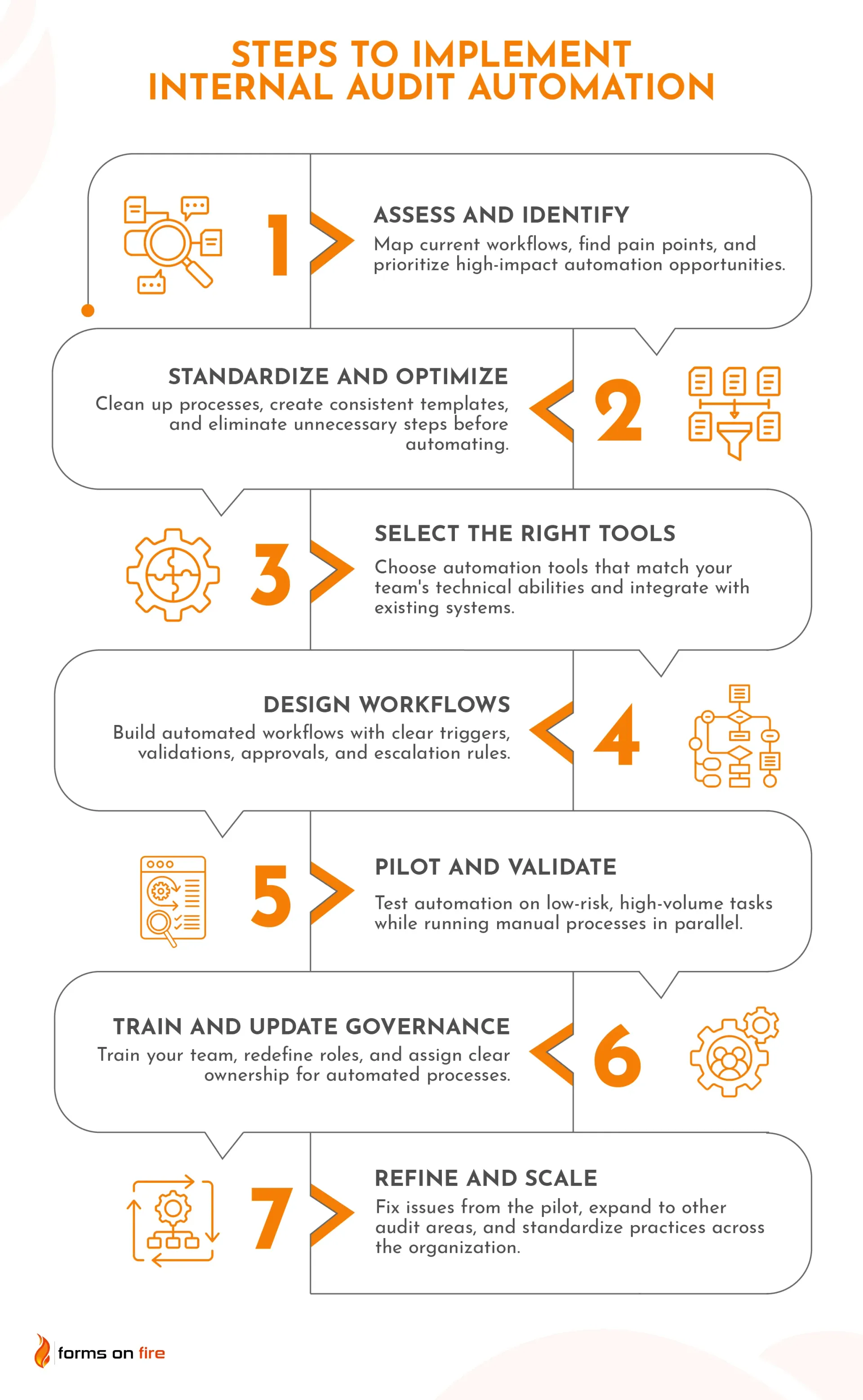
Step 1: Assess current audit processes and identify automation opportunities
Start by mapping out what you're doing now. Walk through your audit workflows from start to finish: how you plan audits, collect evidence, test controls, document findings, and track follow-ups. Write it down. The official process and the workarounds people actually use when the official process doesn't work.
Then look for the pain points. Where does work pile up? Which tasks require someone to copy data from one system to another, fill out paper forms, or chase people down for status updates? Where do mistakes happen most often? These repetitive, manual, error-prone activities are your best automation candidates.
Once you've got the full picture, prioritize. Not everything needs to be automated right away. Focus on processes that combine high risk with high frequency and consider business impact. Automating something that saves your team two hours a week is helpful. Automating something that eliminates a major compliance risk or cuts your audit cycle by 30%? That goes to the top of the list.
Step 2: Standardize and optimize audit processes
Before you automate anything, clean up the mess. Automating a broken process just gives you a faster way to do things wrong.
Begin by standardizing your audit procedures, templates, and documentation. Everyone should be working from the same playbook: same checklists, same evidence requirements, same way of documenting findings.
Then eliminate unnecessary steps. Look at your current process and ask:
- Do we actually need this?
- Does this approval add value or just slow things down?
- Are we collecting data we never use?
Cut the dead weight before you build automation around it.
Define consistent data fields, controls, and approval paths. For example, when people submit incident reports, they should fill out the same fields in the same format. When findings need review, everyone should know exactly who approves what and in what order. Consistency makes automation possible.
Let's say you run maintenance for a manufacturing plant. Every shift supervisor uses their own version of the equipment inspection checklist: one checks 15 items, another checks 22, and the third uses a completely different format. You can't compare results or spot trends this way.
So, you standardize: one checklist, same fields, same criteria for everyone. Put it on tablets so techs fill it out on the floor instead of scribbling notes and transferring data later. Results? Inspections drop from 45 minutes to 20, and compliance reports generate automatically.
Step 3: Select the right automation tools and technologies
Evaluate tools based on your audit needs and technical maturity. If your team is comfortable with technology and you've got IT support, you can consider more sophisticated platforms. If your auditors are still printing emails to file them, maybe start with something simpler.
Consider what capabilities you need:
- Ways to digitize paper forms and automate field data collection?
- Workflow automation for routing tasks and approvals?
- RPA for repetitive data extraction and testing?
- Analytics for spotting trends and anomalies?
- AI for continuous monitoring and predictive risk assessment?
Pick the capabilities that address your biggest pain points first.
Make sure whatever you choose plays nice with your existing systems. If your audit data lives in your ERP, your finance system, and your compliance platform, the tools you use to automate the internal audit process need to pull from all of them without requiring manual exports every time.
Don't forget scalability, security, and regulatory requirements. Ask about user limits, data storage, access controls, audit trails, and compliance certifications before you commit.
Step 4: Design automated audit workflows
Now translate your audit steps into automated workflows:
- What triggers each action? A scheduled date kicks off the audit. A risk threshold gets crossed. A control failure gets flagged by continuous monitoring. Define these clearly so the system knows when to start moving.
- What validations need to happen? Build them at each step: required fields that can't be skipped, data checks that flag obvious errors before they get passed along, approval gates where findings get reviewed before they're finalized.
- Set up approval paths and escalation rules. Who signs off on draft findings? What happens if someone doesn't respond within three days? When does something get kicked up to a manager or the audit committee? Let the system handle the follow-up, so your team isn't playing email tag.
If you are using a compliance platform, take time to configure dashboards, alerts, and reporting outputs. What do auditors need to see during an audit? What does leadership need to track? Set up alerts for high-risk findings, overdue tasks, or control failures that need immediate attention. Design reports that generate automatically.
Picture a manufacturing plant running monthly safety audits across three production floors. The system triggers a safety inspection checklist on the first Monday of every month. Supervisors complete audits on tablets and capture photos of any hazards: blocked exits, missing machine guards, improper PPE storage. Critical violations (exposed electrical, fall hazards, missing lockout/tagout) alert the safety manager immediately.
Minor issues get assigned to floor supervisors to fix within 48 hours. Audits that sit incomplete for three days trigger reminders. Hit five days? They escalate to the plant manager. No more chasing supervisors for paper checklists or discovering that faulty PPE wasn't documented until the next quarterly review.
Step 5: Pilot automation with targeted use cases
Don't flip the switch on automation everywhere at once. Start small, figure out what works, then scale up.
Pick something low-risk but high-volume for your pilot. Monthly expense reviews, vendor compliance checks, control testing that happens every quarter. You want something repetitive enough to show clear efficiency gains, but not so critical that a hiccup becomes a crisis.
Run the pilot alongside your manual process for a bit. Let automation do its thing while your team keeps doing it the old way for a cycle or two. Then compare. Does the automated process catch the same issues? Miss anything important? Flag stuff the manual process overlooked? This parallel run builds confidence before you fully commit.
Now, validate everything. Are the results accurate? Is anything getting dropped? Do your internal auditors have all of the information they need?
Lastly, talk to your team. The people doing this work every day will spot problems and opportunities you'd never see from a distance. What's working? What's frustrating? What would genuinely make their lives easier instead of just being different? Listen to them.
Step 6: Train audit teams and update governance
Walk your auditors through the new tools and workflows; not just a one-hour demo, but hands-on practice with real scenarios. Show them where things live, how to troubleshoot common issues, and what to do when something doesn't work as expected. Make sure they're comfortable before you expect them to rely on it.
Then redefine roles. Automation handles the data collection and repetitive testing, which means your auditors can spend more time on analysis and judgment (which actually requires human expertise). Help them make that shift.
Update your audit methodology, policies, and documentation standards to reflect how you're working now. In practice, that often means updating your standard operating procedures (if they exist).
Finally, establish clear ownership and accountability for automated processes.
Imagine a food processing plant that automated its sanitation audits. Inspectors used tablets to check cleaning procedures and food safety protocols. But nobody owned the digital checklists. FDA guidelines changed. The forms never got updated. The system kept running, audits kept happening, but they weren't checking the right things anymore.
They caught it during a surprise inspection…not ideal. Now the quality manager owns every checklist, reviews them quarterly, and updates forms when regulations change. Someone's accountable, so the automation stays current.
Step 7: Refine and scale the automation
Your pilot taught you what works and what doesn't. Time to fix the rough edges and expand.
Once you've ironed out the kinks, expand. Take what you learned and roll it out to other repetitive, high-volume processes. Started with expense audits? Add vendor compliance, IT access reviews, inventory controls. Scale gradually. Validate as you go.
Your automation might need deeper integration with enterprise systems at this point. Manually exporting data worked fine during the pilot, but at scale? You need direct connections to your ERP, HR system, or compliance platforms. Let data flow automatically without someone babysitting every sync.
Finally, document how automated audits get planned, executed, reviewed, and closed out. Build templates, create guidelines, and make it repeatable so you're not starting from scratch every time.
Simplify internal auditing with Forms On Fire
Forms On Fire is a mobile-first platform built for teams that need to collect data, run inspections and audits, and manage workflows in the field. It's designed for people who need practical automation without a development team on standby.
For internal audits, Forms On Fire enables:
- No-code or low-code automation for internal audits: Build and customize audit processes without writing code or waiting on IT. You define what you need, the platform handles the rest.
- Mobile data collection and standardized audit forms: Auditors capture evidence, photos, timestamps, and notes on-site using tablets or phones. Everything syncs automatically; no more lost paperwork or forgotten details.
- Customizable audit templates: Forms On Fire includes ready-to-use templates for common audits, such as fire safety audit, HVAC audit, and safety audit. Customize them with the drag-and-drop builder or AI form editor: adjust fields, add your company's requirements, and tweak the workflow to fit your business.
- Automated workflows, approvals, and reporting: Set up task assignments, approval routing, reminders, and escalations that run themselves. Customize workflows to match your audit process, not the other way around.
- Improved visibility and control across the audit lifecycle: Track audit progress in real time, monitor open findings, and generate reports without chasing people down for status updates or compiling data manually.
Ready to see how it works for your audit process? Schedule a demo and let’s see how Forms On Fire can streamline your internal audits.