Get Your Risk Assessment Form Template
Three workers are standing around a forklift with a wobbly front wheel. Everyone sees it. Nobody writes it down. Two weeks later, someone gets hurt, and suddenly everyone's scrambling to prove they knew about the problem and were "working on it."
A risk assessment form captures what could go wrong before it does. The right template makes this process repeatable instead of relying on whoever's filling out the form to remember all the steps and details.
Do not let preventable hazards ruin your day. Start your free trial of Forms On Fire and get a digital risk assessment form that actually gets used. Just sign up, grab one of our templates, polish it using our drag-and-drop builder (if needed), and you're good to go.
If you’re here just for the info, here's what you'll learn if you keep scrolling:
- Which fields your risk assessment form actually needs
- How templates turn risk assessment from a memory test into a consistent process
- What construction, chemical, and food service operations must include to stay compliant
- How to build a custom digital form that fits your operation
What should be included in a risk assessment form?
Risk assessment forms show up everywhere:
- Construction and manufacturing use them constantly to address various risks.
- Healthcare facilities run risk assessments for everything from patient handling to infection control.
- Offices might assess ergonomic risks, slip hazards, or security threats.
The specific risks change, but the underlying process stays the same: identify what could go wrong, figure out how bad it could get, and decide what to do about it.
Every risk assessment form needs these fields:
- Assessment details: Date, location, and assessor name. You need to know when and where the assessment happened and who conducted it for compliance audits and tracking risk over time.
- Activity or process being assessed: What exactly are you evaluating? Be specific enough that someone reading this six months from now understands the context.
- Identified hazards: List what could actually cause harm. Chemical exposure, heavy machinery, slippery floors, electrical equipment; whatever applies. One hazard per line works better than paragraphs of descriptions.
- Who's at risk: Employees, contractors, visitors, the public? Knowing who's exposed helps you target your controls. A hazard that affects two trained technicians gets handled differently from one that affects everyone in the building.
- Risk rating: Some numeric or categorical way to prioritize risks. Most forms use a risk matrix combining likelihood and severity.
- Current controls: What's already in place to manage this risk? Safety equipment, training programs, procedures, physical barriers…document what you're currently doing.
- Additional actions required: What else needs to happen? New equipment, additional training, policy changes? Be specific. "Improve safety" isn't an action item. "Install guardrails on the west platform by March 15" is.
- Action owner and deadline: Who's responsible for each action, and when will it get done? Risks don't fix themselves.
Besides these, you might need to add some optional fields that will provide further context:
- Risk category: Physical, chemical, biological, or ergonomic, for example. Helps when you're analyzing trends across multiple assessments.
- Photos or diagrams: Visual documentation of hazards and controls. A picture of that awkward workstation setup tells the story fast.
- Regulatory references: Which OSHA standards or industry regulations apply? Speeds up compliance documentation during audits.
- Previous incidents: Has this specific risk caused injuries or near-misses before? Historical context shows which theoretical risks are actually causing problems.
Some industries require you to also include specific fields. For example:
- Construction: OSHA requires hazard assessments under 29 CFR 1910.132, which must be documented through written certification. Many contractors may require detailed Job Safety Analysis forms for high-risk tasks that include step-by-step breakdowns, permit numbers, and equipment inspection records.
- Chemical industry: Process hazard analysis requires Material Safety Data Sheet references, exposure limits, and emergency response procedures.
- Food service: HACCP plans need critical control points identified, monitoring procedures, and corrective actions specific to food safety.
Some industries might require management sign-off, specific review frequencies mandated by regulation, or integration with permit-to-work systems. Always check your local regulations since requirements vary significantly by location and sector.
An example of a digital risk assessment form template
Digital forms beat paper every time. Your team can fill them out on phones or tablets right where the work happens, photos upload automatically, and you can actually find the assessment or generate reports when you need them six months later.
Here's what a practical digital risk assessment template looks like. You can click on each image to see them in full size.
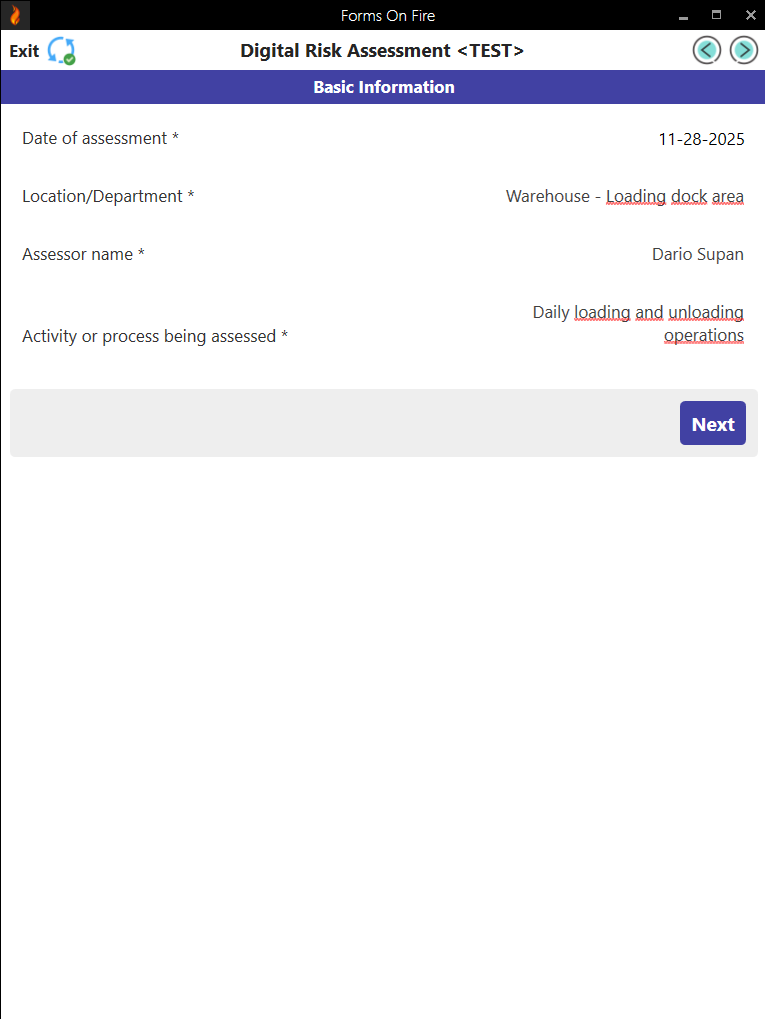
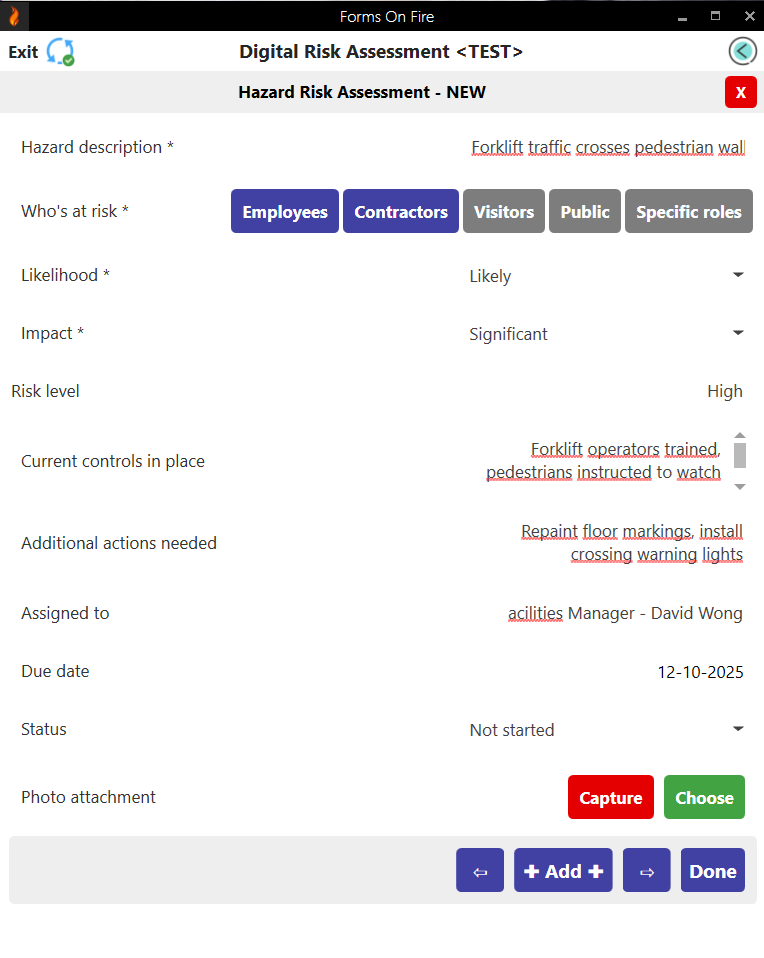
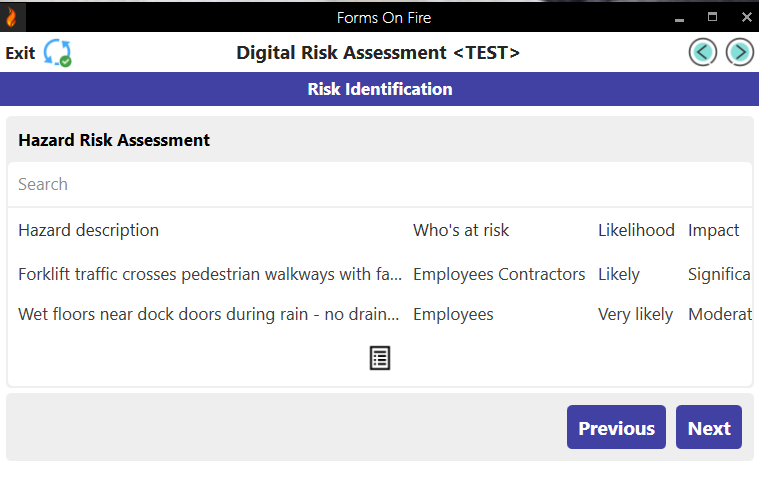
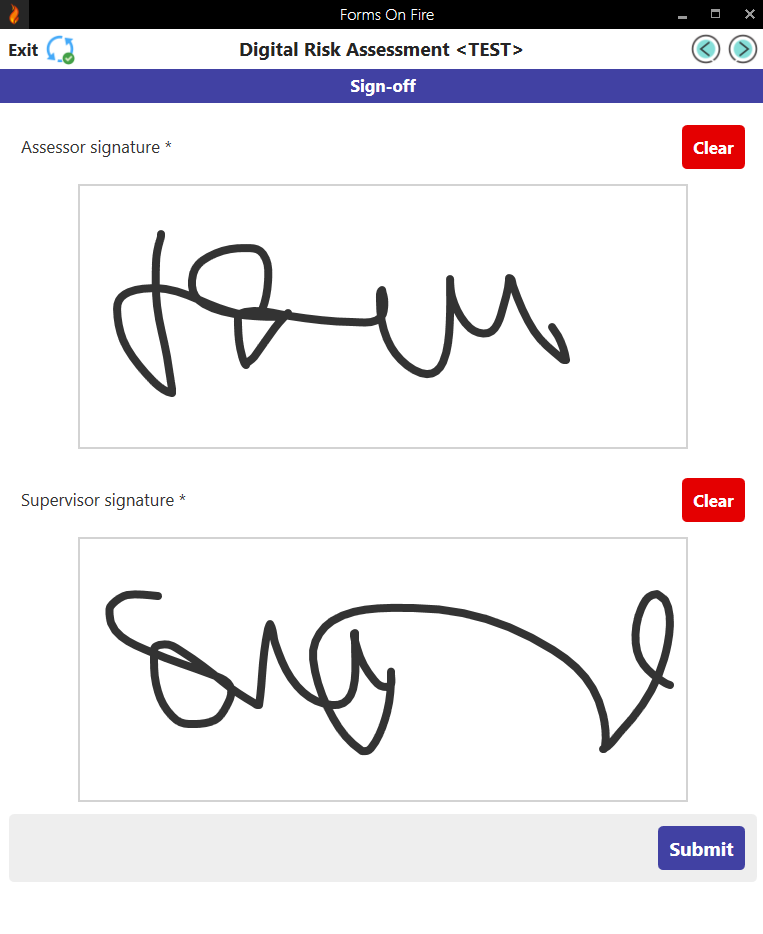
This template gives you the essentials that work across most operations. From here, you will probably need to customize it a little for your specific industry and risks. Don’t fret, our drag-and-drop builder makes this super easy.
The role of the template in the risk assessment process
A risk assessment template is your roadmap through a process that can feel overwhelming without structure. Templates keep you from missing critical steps, ensure consistency across assessments, and turn what could be a three-hour guessing game into a systematic review you can knock out efficiently.
Here are five standard steps for conducting a risk assessment:
- Identify the hazards: Walk through the workspace and spot anything that could cause harm. Talk to the people doing the work; they usually know what's sketchy before you do.
- Determine who might be harmed and how: Figure out who's exposed to each hazard and what kind of injury or illness could result. This tells you where to focus your energy.
- Evaluate the risks and decide on controls: Look at how likely each hazard is to cause harm and how severe that harm could be. Then determine what you're already doing to control it and whether that's enough.
- Record your findings: Document everything: the hazards, who's at risk, your risk ratings, existing controls, and what additional actions you need. This is where your template earns its keep.
- Review and update regularly: Set a review date and actually stick to it. Workplaces change, new equipment arrives, processes shift. Your risk assessment needs to keep up.
Templates bring consistency: everyone documents hazards the same way, uses the same risk ratings, and follows the same format. Digital templates let you filter by category, pull reports on top risks across all locations, or spot patterns. Paper forms in filing cabinets can't do that.
The assessment moves faster because you're not starting from scratch every time. Templates walk you through each step, so your brain focuses on actual evaluation instead of figuring out the format. Built-in risk matrices eliminate the mental math.
Follow-up happens because it's trackable. Action owners and deadlines make sure risks actually get fixed instead of sitting in a report somewhere. When inspectors show up, you hand them a completed template with signatures and documented actions.
Want to learn more about specific types of risk assessments? Here are some useful guides to add to your reading list:
- https://www.formsonfire.com/blog/health-and-safety-assessment
- https://www.formsonfire.com/blog/ehs-risk-management
- https://www.formsonfire.com/blog/fire-risk-assessment
- https://www.formsonfire.com/blog/farm-health-and-safety-risk-assessment-best-practices
Create a custom risk assessment template with Forms On Fire
Forms On Fire is a cloud-based platform that lets you build digital forms that work on any device. Your team fills them out in the field, photos upload automatically, and all your data syncs in real time. No more lost clipboards or illegible handwriting when you need to find last quarter's assessment.
The real advantage? You're not stuck with a generic template that sort of fits your operation. Customize the risk categories for your industry, add your company's specific rating system, include the exact fields your inspectors need, and skip the ones they don't.
Here's how to get started:
- Start a free trial: Sign up for Forms On Fire and see what the form builder can do. No credit card needed.
- Build your risk assessment form: Browse our template database, find a [Ime templatea], and tweak it. Add your hazard categories, adjust the risk matrix, include photo requirements. It's drag-and-drop simple.
- Try it on one site first: Run through a couple of assessments with the digital form and see what works. Adjust anything that feels clunky or slows your team down. Then roll it out across all your locations.
Risk assessments only help when they actually get done. Make yours easy enough that people will use it every time.
FAQ about risk assessment forms
What are the five things a risk assessment should include?
Hazards, who's at risk, likelihood and severity ratings, existing controls, and what actions you need to take. Everything else is just supporting detail unless mandated explicitly by regulations.
How to create a risk assessment form?
List the basic info fields you need (date, location, assessor), build a table for hazards and risk ratings, add action items with owners and deadlines, and include signature fields.
Digital form builders like Forms On Fire let you do this in minutes with pre-made templates and a drag-and-drop builder supported by an AI assistant.
Can you write your own risk assessment?
Yes, as long as you know what to do. Use a template as your starting point, but customize it to match your actual workplace hazards, industry requirements, company processes, and even branding.
Is there a standard risk assessment template?
There's no universal standard — different industries and regulations require different approaches. Most follow the same basic structure (identify hazards, rate risks, plan actions), but the specific fields and rating systems vary.
What to focus on while writing a risk assessment?
Be specific about hazards and clear about who's responsible for fixing them. Vague descriptions and missing deadlines turn risk assessments into paperwork exercises that don't actually improve safety.